The course text lives on this site; the Rust exercises (Arkworks, small proofs-of-concept) live in a separate repository you clone on your machine. You only need the Rust toolchain and Git — dependencies are pulled automatically by Cargo when you build.
1. Install Rust with rustup
If you already have rustc and cargo in a terminal, skip to the next section. Otherwise install the official toolchain manager:
- macOS / Linux / WSL: in a terminal, run
curl --proto '=https' --tlsv1.2 -sSf https://sh.rustup.rs | shand follow the prompts, then restart the terminal (or runsource "$HOME/.cargo/env"). - Windows: download and run rustup-init, then use the “Rust” toolchain in PowerShell, CMD, or Git Bash.
Official overview: rust-lang.org/tools/install.
2. Check that Cargo works
Run:
rustc --version
cargo --version
You should see version lines for both commands. If the shell reports “command not found”, ensure $HOME/.cargo/bin is on your PATH (rustup usually configures this).
3. Clone the companion repository
Pick a folder for coursework, then clone the labs repo (replace the URL if your instructor gives a fork or mirror):
git clone https://github.com/bsaepfl/zksnarks-101-labs.git
cd zksnarks-101-labs
If the repository is not public yet, use the URL or archive your instructor provides instead of the placeholder above.
4. Fetch dependencies and build
Rust libraries (including arkworks crates) are declared in the repo's Cargo.toml. You do not install them system-wide. The first time you build, Cargo downloads crates from crates.io and compiles them under target/ — expect a few minutes and a few hundred MB of disk space.
cargo build
To compile and run the automated checks (if the repo provides them):
cargo test
Use cargo run only when the README names a specific binary; many course repos use tests or examples as the main workflow.
6. Editor support
Install the rust-analyzer extension in VS Code, Cursor, or your IDE of choice. It uses the same cargo project as the terminal, so navigation and error highlighting match cargo build.
Troubleshooting
- SSL / network errors when building: ensure you can reach
crates.io(VPN or corporate proxy settings sometimes block Cargo). - Very old Rust: run
rustup updateso the edition and dependencies in the repo match a recent stable toolchain. - Missing system linker (Linux): install a C toolchain (e.g.
build-essentialon Debian/Ubuntu) — rustc needs it to link binaries.
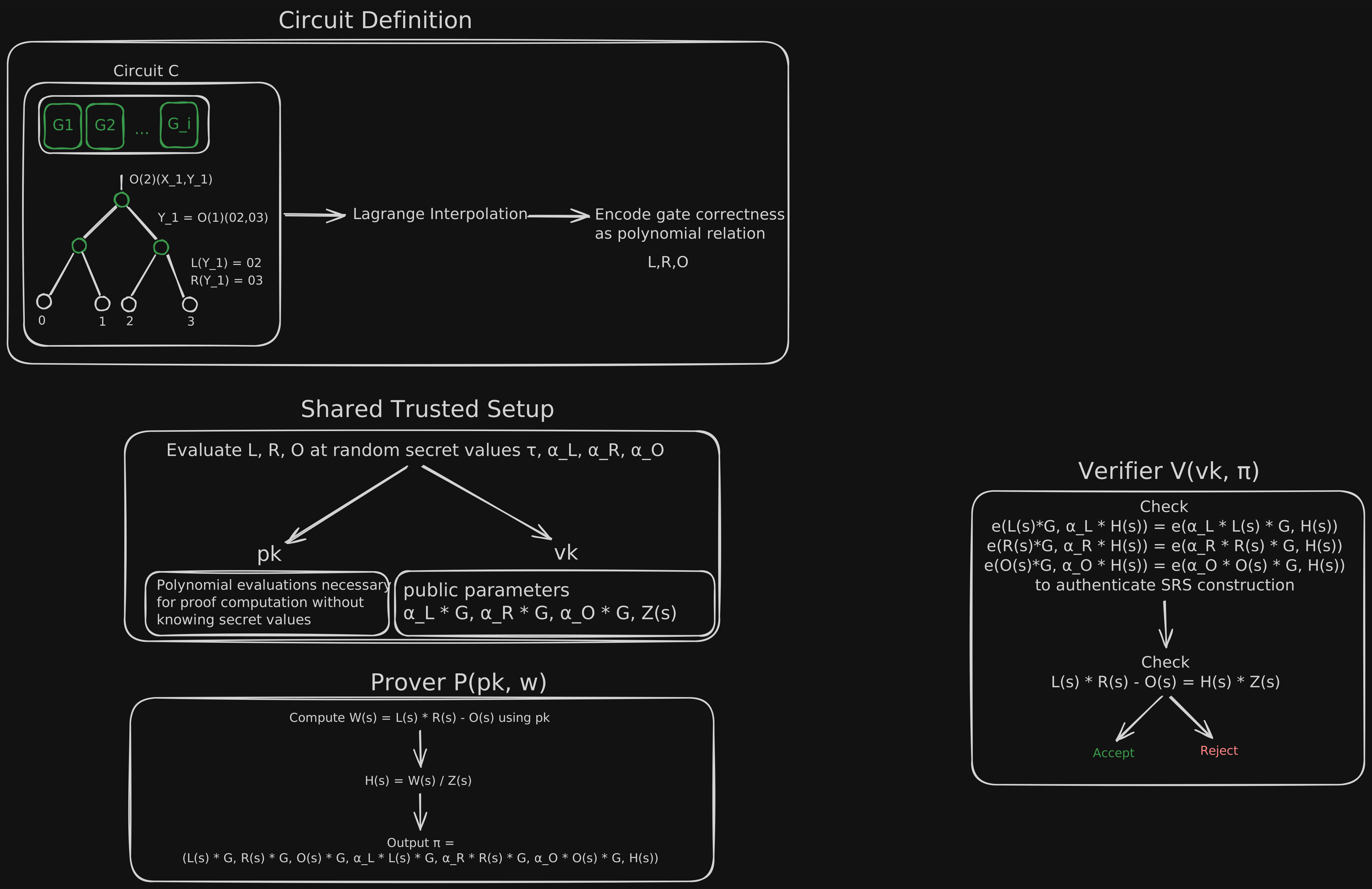
Reference: full pipeline (Excalidraw)
Wide canvas export of the end-to-end pipeline for reference while you work through the lessons and labs.